Download Market Replay Data in Bulk
No more clicking one day at a time. Download weeks of NinjaTrader replay data with a single click.
Free forever · No credit card · Instant delivery to your inbox
The Problem
Downloading replay data in NinjaTrader means clicking one day at a time. Need a month of ES data? That's 22 clicks, 22 waits.
The Solution
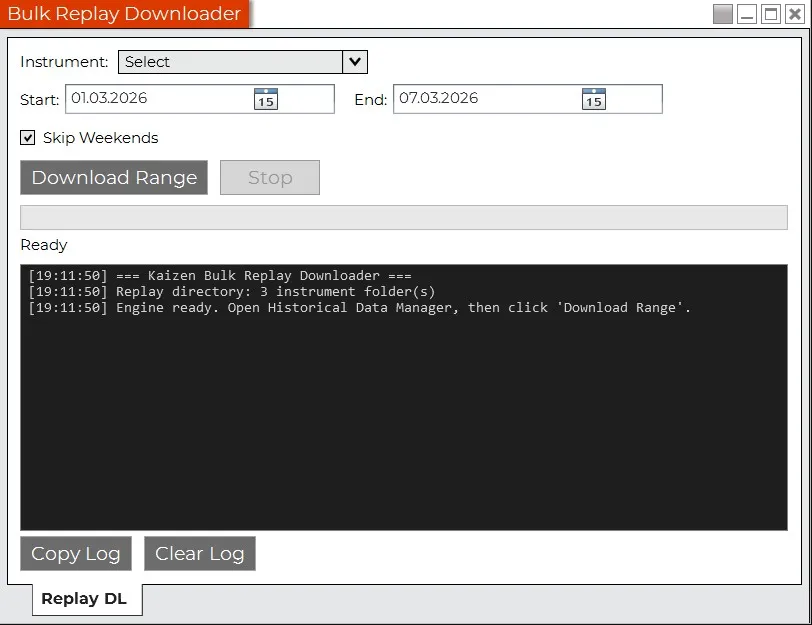
Select your instrument, set a date range, click once. The Bulk Replay Downloader handles the rest.
Features
Multi-day range download — select start and end date
Smart skip logic — weekends, already downloaded, no data available
Status logging — OK, SKIP, NO DATA, ERROR, TIMEOUT
Works with Rithmic, Kinetick, CQG and other data providers
1.5s delay between downloads to avoid server overload
Stop button to cancel at any time
How It Works
Enter your email to get the download link
Run the installer — one click
Open NinjaTrader → New → Bulk Replay Downloader → set range → go
Requirements
- NinjaTrader 8 (8.1.x or later)
- Active data connection (e.g. Rithmic, Kinetick, CQG)
Installation
Option A: Installer (Recommended) Recommended
- 1. Close NinjaTrader 8
- 2. Double-click "Install-KaizenBulkReplayDL.cmd"
- 3. Start NinjaTrader 8
Option B: PowerShell Script
- 1. Close NinjaTrader 8
- 2. Open PowerShell and run: Install-KaizenBulkReplayDL.ps1
- 3. Start NinjaTrader 8
Option C: Manual
- 1. Close NinjaTrader 8
- 2. Copy KaizenBulkReplayDL.dll to Documents\NinjaTrader 8\bin\Custom\AddOns\
- 3. Start NinjaTrader 8
Ready to save hours? Get the free download.
Free forever · No credit card · Instant delivery to your inbox